使用前,请严格看完说明。未按本页完成配置,Explore 子代理使用的模型与 Agent 分析深度可能不符合预期。
非常重要。如果找不到配置选项,请截图发给 Cursor,让它帮您配置即可。
1. 设置 Explore Subagent Model
这一项一定要设。打开 Cursor 设置,左侧进入Models,找到 Task Models 下的Explore Subagent Model,选择「Cursor Grok 4.5 High Fast」(见下图红色标注)。该项决定 Explore 子代理做初步调研时使用的模型。
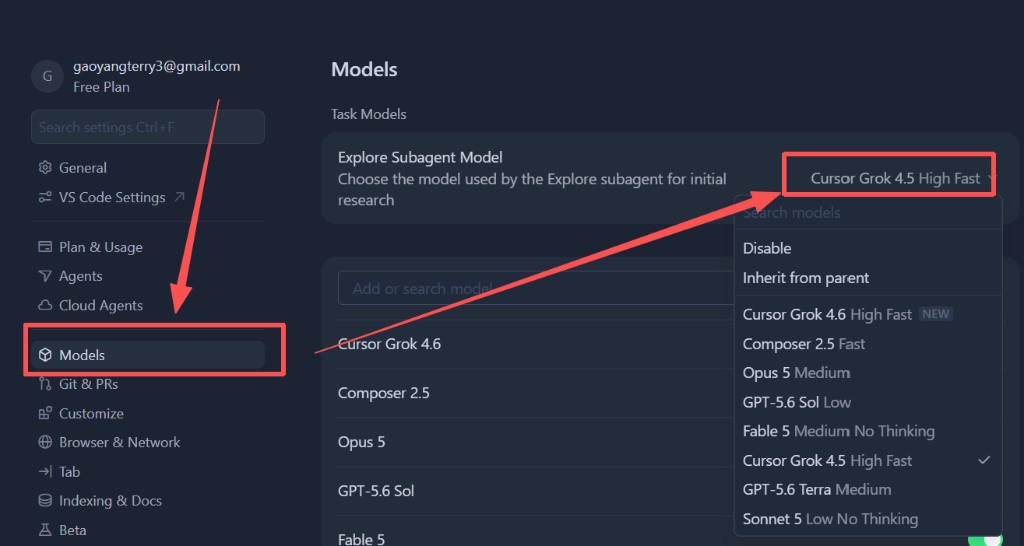
请注意:设置了子代理,不代表官方一定会用您设的那个模型。官方这里的含义是「探索子代理」。不过很多朋友反馈:这里设好了,实际就够用。
更稳妥的做法是:Cursor 子代理设置 + Rules 一起用。可在 Rules 里加这一句:
子代理模型规则:严格按照我约定好的设置执行,多次连不上禁止调用其他模型。
2. 设置 Default Approach 为 Deep
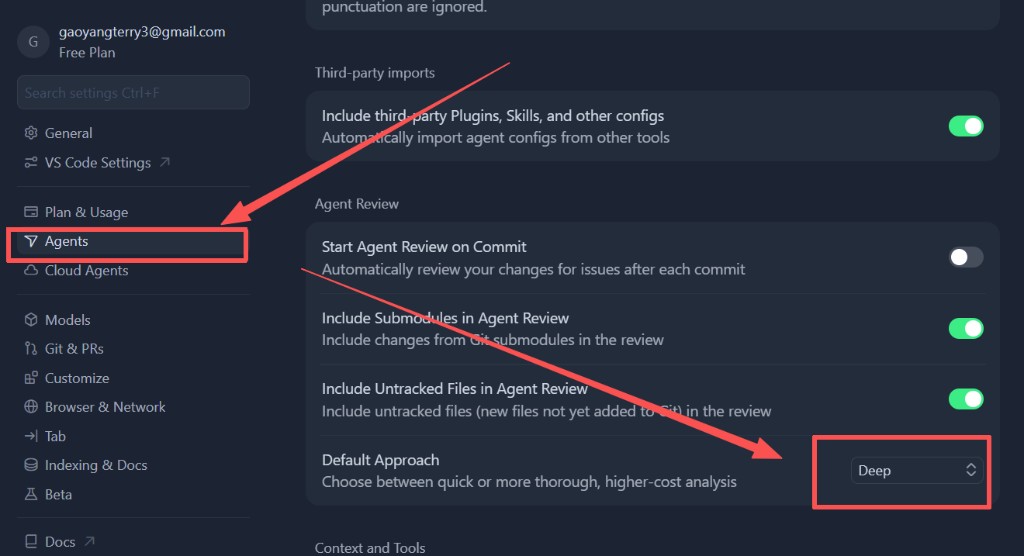
仍在 Cursor 设置中,左侧进入Agents,找到Default Approach,选择「Deep」(见下图红色标注)。Deep 会做更充分、成本更高的分析。
3. 设置完成后
两项都改好后,回到 CursorHub 启动工作环境。详细步骤见在 Cursor 内使用。